Q30. You manage several companies within one Dynamics 365 Business Central database. Most users work in only one of these companies, where they have a specific role.
You need to set up security according to company requirements.
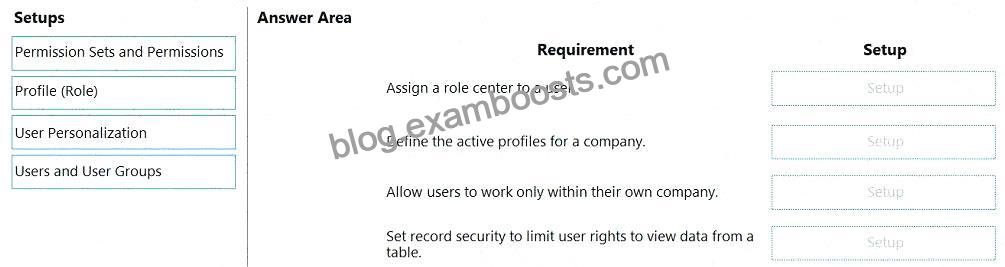
Which setup should you use? To answer, drag the appropriate setups to the correct requirements. Each setup may be used once, more than once, or not at all. You may need to drag the split bar between panes or scroll to view content.
참고: 정답을 선택할 때마다 1점의 가치가 있습니다.
설명:
Comprehensive Detailed Explanation
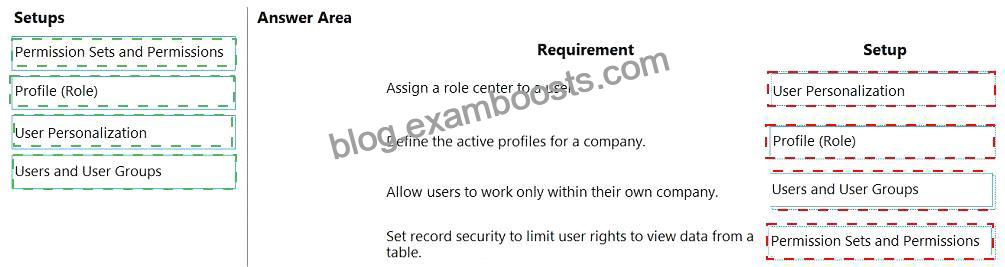
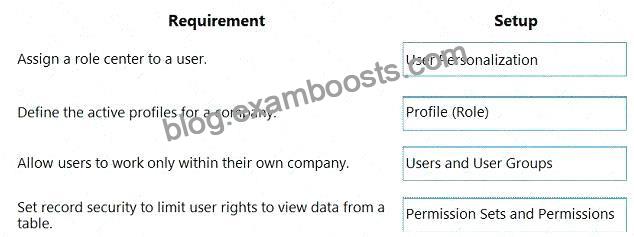
* Assign a role center to a user # User Personalization
* The User Personalization page defines the Role Center (profile) for a specific user. This controls the home page and navigation menus that appear when the user signs in.
* Define the active profiles for a company # Profile (Role)
* Profiles (Roles) are templates for Role Centers and define the functionality and pages available to users. You configure active profiles at the Profile (Role) setup level.
* Allow users to work only within their own company # Users and User Groups
* On the Users setup page, you can specify which companies a user has access to. This ensures they can only work within their assigned company.
* Set record security to limit user rights to view data from a table # Permission Sets and Permissions
* Permissions (via Permission Sets) define object-level and record-level security, controlling access to tables, reports, pages, and limiting rights like Read, Insert, Modify, and Delete.
Microsoft Learn References:
* Assign Permissions to Users and Groups in Business Central
* Manage Profiles (Roles)
* User Personalization in Business Central
* Manage Users and User Groups


